Comparison · Tested October 6, 2026
Both are modern WooCommerce side carts built on the Store API. We installed them in the same store to show you where they differ, and which one fits yours.
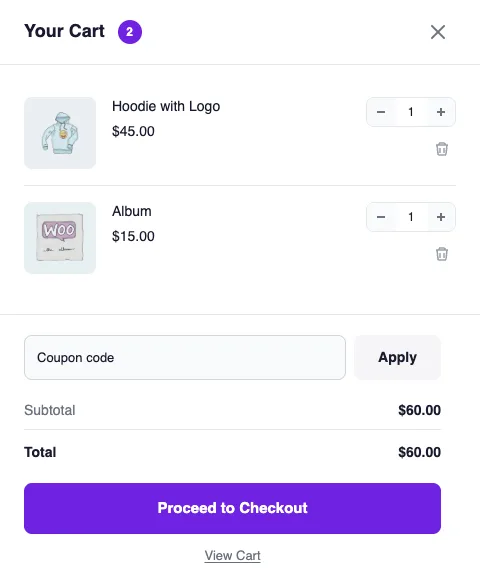
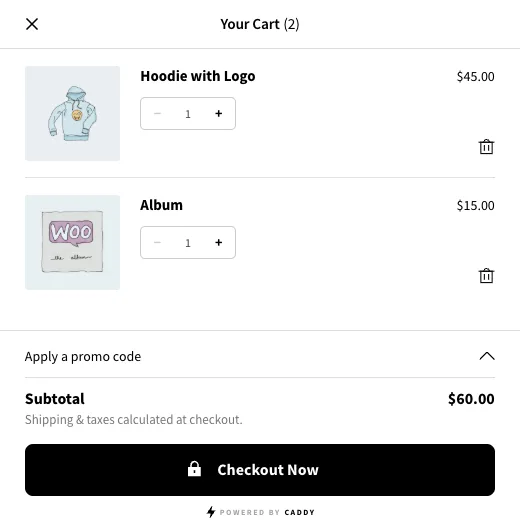
The short version
Four differences that matter most when you pick a side cart. Everything below is checked against both plugins on October 6, 2026.
- $49 vs $99 Pro for one site, per year CartPops Pro costs half of Caddy Pro, with every Pro feature included.
- 3 of 3 vs 0 of 3 Opens from a block theme shop grid On Twenty Twenty-Five, Caddy added the product but didn't open its cart. CartPops opened every time.
- Built in vs none Bundle Builder Offer frequently bought together sets with a bundle discount, right under the cart item.
- $199 vs no lifetime plan Pay once for a lifetime license One payment for one site, with three years of priority support. Caddy only sells yearly plans.
Which one fits your store?
Choose CartPops if you
Our pick- Want rewards, bundles, add-ons and revenue analytics in one plugin
- Run a block theme, or might switch to one later
- Want Pro for $49 a year, or a lifetime license for $199
- Want a cart timer, product spotlight and one-tap extras like shipping protection
Choose Caddy if you
- Need a free shipping bar without paying for Pro
- Want a save for later list in the cart
- Run PHP older than 8.3 and can't upgrade yet
Side by side
Free versions tested in the same store. Pro features and prices from each plugin's own pages, checked October 6, 2026.
| Feature | | |
|---|---|---|
| Growing the order | ||
| Bundle Builder with a bundle discount | Pro | No |
| Reward tiers with a discount or free gift | Pro | Pro |
| Cart timer and product spotlight | Pro | No |
| One-tap extras like shipping protection | Pro | No |
| Free shipping bar | Pro | Free |
| Upsell and cross-sell recommendations | Free | Free |
| Analytics with revenue per feature | Pro | Cart analytics (Pro) |
| In our test | ||
| Opens after every add to cart on a classic theme | Yes | Yes |
| Opens from a block theme shop grid | Yes | 0 of 3 tries |
| Works right after install, no setup | Yes | Yes |
| Built on | ||
| WooCommerce Store API and Interactivity API | Yes | Yes |
| Cart Drawer and Cart Launcher blocks for the Site Editor | Yes | Cart block |
| Dark mode that follows the visitor's system | Yes | No |
| Pricing | ||
| Pro for one site | $49 / year | $99 / year |
| Monthly plan | $4.90 / month | No |
| Lifetime license | $199 once | No |
| Money back guarantee | 14 days | 14 days |
Read somewhere that CartPops runs on jQuery, costs $89 a year or has no analytics? That was CartPops 1.x. Version 2.0 is rebuilt on the WooCommerce Store API, Pro starts at $49 a year, and conversion analytics are included.
Switching from Caddy takes minutes
A side cart only changes how the cart is shown. Your products, orders and customers stay exactly where they are.
- Install CartPops from WordPress.org Free, and it works right away with your theme. No setup wizard.
- Deactivate Caddy Your cart contents, orders and products aren't touched. Only one side cart should be active at a time.
- Set up your rewards and recommendations Pick a preset, set your free shipping and reward tiers, and preview every change live before you save.
Questions about switching
Is CartPops really cheaper than Caddy?
Yes. CartPops Pro is $49 a year for one site, or $4.90 a month. Caddy Pro starts at $99 a year. CartPops also offers a lifetime license for $199.
Do both work with block themes?
Both are built on the WooCommerce Store API and the Interactivity API. In our test on Twenty Twenty-Five, CartPops opened after every add to cart. Caddy opened from product pages, but not when we added a product from the shop grid.
Will I lose orders or settings when I switch?
Your orders, products and customers aren't touched. Caddy's settings don't carry over, so you set up your rewards and recommendations in CartPops once.
Does CartPops have a free shipping bar?
Yes, in Pro. The Shipping & Rewards Meter adds free shipping plus up to two tiers with a discount or a free gift. Caddy includes a basic shipping bar in its free version.
Can I try CartPops before I install it?
Yes. Open the live demo and try the real drawer in a demo store, with rewards, bundles and add-ons.
Still have questions? Get in touch with the team
See the difference for yourself
Try the real CartPops drawer in our demo store, or install the free plugin and switch in a few minutes.